Wednesday, July 6, 2016

How to dowload YouTube videos without extensions or software

So you just bumped up on a YouTube video which you want to download and watch it offline. It can be a cute cat video or the latest trailer of your favorite star's movie, anything literally as long as it is in YouTube, you can download it. But you are not interested in downloading a YouTube video downloader software or adding an extension to your already clumsy list of addons in your browser.


The video can be downloaded easily by using "ClipConverter" website. In addition to the download option, you also get the choice to select the quality of video. Also you get the choice to convert the video into mp4,3GP,avi, mov video formats or mp3,m4a,aac audio formats. Here are the steps which are fairly easy to follow.

Monday, June 27, 2016

The top 3 YouTube apps for Windows 10 devices

"What !? Windows 10 doesn't have a official YouTube app?" This is something I have heard from my friends, specially in the case of Windows 10 Mobile. For the record, Windows (phone) never had a official YouTube app. Thank Google for that. But that doesn't mean that there is no way to access YouTube. You can do so using your web browser to access the mobile site for occasional browsing and watching videos. This won't suffice if you want save videos offline, get notification from your favorite channels and other advanced features which you can find in the official YouTube app in other platforms.

Fortunately, there are several beautiful third party apps that are equivalent to the official apps. Here is a list of such apps.

1) Tubecast

Multitasking : A video running in the bottom left corner while browsing other videos.
Tubecast is one of the finest and full featured YouTube client that you will ever find in Windows. The interface is clean and slick. You can log in using your Google account and bring your favorite channels at the finger tips. You can also comment in a video without leaving the screen and the app supports swipe gestures making navigation a breeze in touch enabled devices. Offline videos (Preload) are supported and you can choose between SQ,HQ or HD for saving that video. It has a live tile and supports push notifications to keep you updated.

Sunday, June 26, 2016

Microsoft Edge will become my primary browser but WHY ?

If you have been following me for a long time, you probably know that Chrome has been my browser of choice since I started blogging but that is about to change for several *good* reasons. With the recent tests and improvements made to Edge, it is time to reconsider the options available in the market.


What's wrong with Chrome ?

Chrome once represented what a modern browser should be. Be it the extensions and themes support or the simplicity of it's UI combined with good performance kept me hooked to it for a long time in my desktop. It still has all these features with Sync using Google account being a very useful feature for Android users.

Wednesday, May 11, 2016

WhatsApp for PC : Hands on and the (im)possibility of UWP app

WhatsApp announced their desktop apps for PC and Mac, which is nothing more than a web wrap of WhatsApp Web but with notifications directly in your computer.

Opening the app presents you with the same UI that you find in WhatsApp Web. The login process is also similar, you open WhatsApp in your phone and scan the QR code, voila ! All your chats are synced to your desktop.


The application has a set of options in the menu bar. Under WhatsApp menu you have "new chat", "new group", "Profile status" and "Log out" which are pretty obvious and useful. The "+" sign also allows you to start a new chat with your contacts.

Tuesday, May 10, 2016

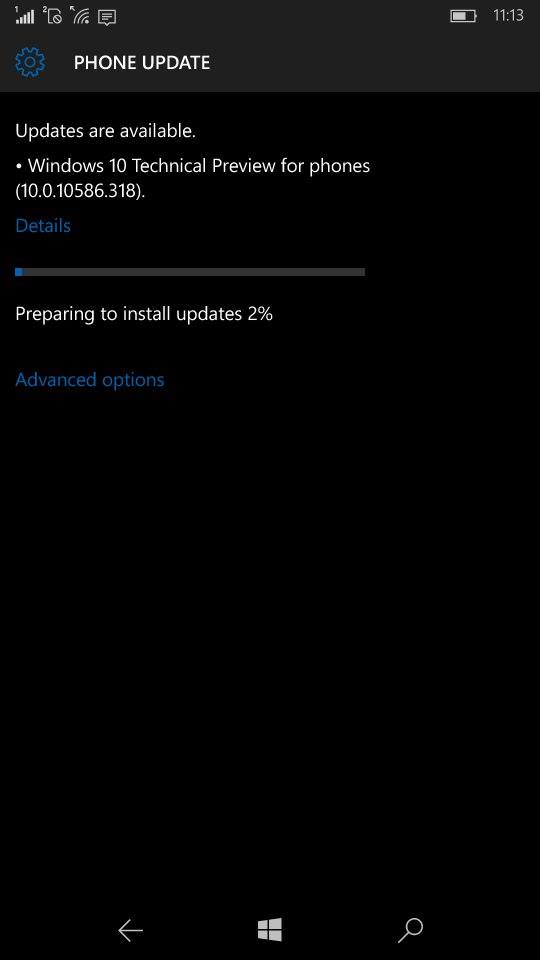
Windows 10 Build 10586.318 available for PC and Mobile devices. Full changelog

Microsoft has released this month's cumulative update for both smartphones and PC's running Windows 10. The update pushes the build number to 10586.318 and it is available for Windows Insiders in Release Preview Ring and to devices running Windows 10 officially. As it is another cumulative update, there is no new features added but there is a good amount of bug fixes for the two platforms. Here are the changes


  • Improved reliability in a number of areas including Cortana, Bluetooth, Shell, Internet Explorer 11, Microsoft Edge, Miracast, and USB.
  • Fixed memory leak that occurs when opening a portable document format (PDF) form multiple times.
  • Fixed issues with text alignment for right to left languages in Internet Explorer 11 and Microsoft Edge.
  • Fixed issue that affected Bluetooth function when a PC resumes from sleep.
  • Fixed issue where user accounts weren't locked out after a number of failed sign in attempts.
  • Fixed issue with revised daylight saving time.
  • Fixed issue that sometimes corrupts CompactFlash cards inserted into a card reader.
  • Fixed additional security issues with kernel mode drivers, remote procedure calls, the Microsoft Graphics Component, Internet Explorer 11, Microsoft Edge, Windows Shell, Windows Journal, Virtual Secure Mode, Schannel, and Jscript.

Windows 10 costs upto $199 after the offer ends, Upgrade now !

Microsoft has confirmed that the free upgrade to Windows 10 will be ending on July 29 as it was announced last year during the launch. As of now 300 million devices are in Windows 10 and Microsoft plans to get on 1 billion devices to Windows 10 in the next few years, for this target. free upgrade is supposed to act as a catalyst to the growth of the new platform. With less than three months remaining for the offer, the pricing of Windows 10 has reached the internet.

Here is the how the pricing of Windows 10 looks like after the offer ends
After July 29, 2016
Windows 10 Home: $119.99
Windows 10 Pro: $199.99

The pricing is very similar to how Microsoft priced their previous generation operating systems. Even the retail editions of Windows 10 which are available for purchase in Microsoft Store lists the same pricing. So it is pretty obvious that Microsoft would not change the pricing. In case you are wondering what are the differences between Home and Pro editions, you can find them here.


Microsoft has been very committed to actively update Windows 10 with new features and reliability updates. November update ( aka TH2 or build 10586) brought a plethora of improvements over the initial version such as improved snapping,colored title bars and more optimizations to the overall performance and reliability.