Wednesday, April 3, 2019

The idea of a Chromium based Edge probably came from Mobile

When Microsoft announced a new browser replacing the clunky Internet Explorer with a refreshed, lightweight and modern browser, the industry had a lot of expectation from the new browser, Microsoft Edge. Though, what followed was a release of a half baked browser with the initial version of Windows 10. The blue logo with "e" didn't help with the visual cues for user as well. That combining with the lack of extension and customization, Microsoft had a browser which needed some serious attention.


It's been three plus years since that happened, Microsoft has been refining Edge and adding new features to it but rather slowly as compared to the competition. The updates came with the major Windows 10 updates, that happened at irregular points of time before Microsoft decided to stick to two releases from last year. Extension support came almost after one year and the selection is still limited. Meanwhile, the demise of Windows 10 Mobile relieved the Edge team of updating it's mobile browser but Microsoft knew they had to keep their browser relevant to users, only way to achieve that was to release the browser to other mobile platforms. Hence they released Edge for iOS and Android, only this time, the browser was based on the web engine supported in the platforms, WebKit for iOS and Blink for Android.

Wednesday, February 6, 2019

The Realme's, Redmi's and M's

What a time is it for the smartphone world, to be a buyer of a phone at every segment has never been more compelling than today. But who are the ones causing this change, how is it beneficial for them? Let's take a ride across the ideas and offerings from the brands of the day.

The Redmi's


Redmi Note 5 Pro
Xiaomi has been one of the most sought brand for value for money smartphone in Indian and the Global Arena. Their Redmi line up, now a separate brand, has been selling like hot cakes which helped them become the most popular brand dethroning Samsung in the process. The Note series has been the best selling phone in each quarter. Last year, when the Redmi Note 5 Pro was introduced, it was a phone of different league with almost zero competition in the market. I think it really was the phone that upped the game when it came to mid-range offerings. But then again, when it looked like nothing would stop Xiaomi from their dream run, things happened in the real quick in the industry. 

Tuesday, August 8, 2017

Catching up! Windows, Android and more.

My dear followers and readers, I've not been actively engaged in blogging over the past year. Now I kind of look back at what happened last year, the biggest change in me has been the shift of interest from writing technical stuff to the artistic way of writing. Yes, you read that right, I've been lately writing quotes, poems and short stories at MycroLines. 

The last post I wrote was about a Windows Insider build. Since then we have had around 50 odd builds. But I'm not going to write anymore of builds, unless it brings something substantial. As time progressed, I've seen Windows phones going dark. Yes, my old Lumia 535 is now with my dad and my primary phone is a Android device. You can ask me, how difficult was the transition from Windows to Android was? I would say it was seamless, I managed to import all my outlook contacts into Google contacts using the in-built tool. I could have sticked to Windows phone but it was never a story that was going to succeed. Microsoft's actions to shift focus to third party platforms meant that apps were getting better in rival platforms while Windows phones were left behind sub-par experiences.

Why Android?

I was pleasantly surprised by the quality apps found in the Play Store, coming from an lacklustre app experience from Windows phones, Android as a platform, has a number of quality apps. I'll not talk about the quantity of apps because no one is going to install every app in their phone but whatever the need is, there is an app for you. This is why Android is the most preferred mobile OS, and it is the same reason why Windows phones never grew. Android is Open source, hence the OEM's have the capability of tailoring the experiences for their devices. My Redmi 3s runs MIUI 8.5 on top of Marshmallow. Before someone quickly dismisses MIUI as a clone of iOS, I can confidently say that it is a general misconception. At the first glance, the layout of home screen might resemble the iOS screen but it is Android, in very nature, supports high level of customization. I've started liking MIUI and the next major update, MIUI 9 is just around the corner making the Android experience a little more sweeter.

Windows, tablets and PCs.

I have tried Linux, Ubuntu, Kubuntu, Linux Mint and the beautiful Elementary OS. Although they are wonderful platforms, they share the same problem as Windows phones, lack of apps. Windows in PC is still the most productive desktop OS you'll ever need. Windows 10 with each update is progressing towards a unified and feature rich platform. The tablet and notebook experiences are moving together shared experiences in harmony. The integration of Cortana, OneDrive and Office in Windows,Android and iOS is forming a solid foundation for the future of Windows. At the end of the day, I'll still take Windows on a PC.


In the end, as a tech enthusiast, I believe it is good to stick with what works for you rather than worrying about the small differences and problems in the platform. Whichever the platform is, staying productive is the main purpose.


Friday, July 15, 2016

Windows 10 Build 14390 is available for PC and Mobile.


Hello Insiders, we have a new build waiting for us to test. Just like the previous builds, this one too concentrates on fixing those last of few bugs remaining in Anniversary update. We might very well get the RTM as soon as next week which will then be followed by small cumulative updates in order to make the Anniversary update available on August 2 worldwide for the general public.

Microsoft has fixed several bugs, significant ones include Improved Battery Life on Windows phones and overall polish and performance. Amazon assistant is a new extension available for Microsoft Edge. This build takes us almost there!

Improvements and fixes for PC

  • You should no longer see the error code 0x80004005 when enabling Developer Mode on the “For Developers” Settings page if your PC is using a non-EN-US language.

Known issues for PC

  • AWARENESS: A recent fix went into place for the Hyper-V firmware that will that affect the ability to boot Windows Server 2016 Tech Preview 5 VMs with Secure Boot enabled. A fix for TP5 builds has been developed however, due to release schedules, the Insider Preview build changes will be released before the TP5 fix is released. During that time, if you try to boot a new TP5 VM with Secure Boot enabled, it will fail. The workaround is to disable Secure Boot during this period.

Thursday, July 7, 2016

Windows 10 Build 14383 is available for PC and Mobile.

Microsoft has just released a new build to insiders in the fast ring. Windows 10 build 14383 as expected brings a lots of fixes as the anniversary update is nearly done and set to be released on August 2 for both PC and Mobile devices. Microsoft will continue to release builds mostly with fixes this month. Key fixes include improved accessibility to Extensions in Store and battery life in mobile ( Yay!).

Improvements and fixes for PC

  • The link to “Get more extensions from the Store” under the Extensions pane in Microsoft Edge now takes you directly to the Store to download available extensions.
  • We have changed the keyboard shortcut to invoke Cortana in listening mode to Win + Shift + C based on feedback from Insiders experiencing a large number of unintended activations of Cortana while in listening mode. Speaking “Hey Cortana”, when enabled in Cortana Settings, continues to invoke Cortana in listening mode as it always has.
  • Going forward from this build, updates to the Quick Action area of Action Center will be preserved across upgrades.
  • We fixed an issue where disconnecting the Surface Book from an external monitor set as primary might result in the Surface Book screen showing in portrait rather than landscape until having detached and reattached the screen.
  • We fixed an issue where the Settings app was showing media controls in the taskbar preview window.
  • We fixed an issue where dragging the file comparison or manage library dialogs between two monitors with different DPIs would result in the dialog content no longer displaying correctly
  • We fixed an issue where the checkmark used to indicate a selected state in app bar toggle buttons wasn’t visible in high contrast, for example in the Photos menu under “…”.
  • We fixed an issue where connecting to a PC using Remote Desktop when a maximized window is immediately behind the Remote Desktop dialog would result in the subsequent the Credential UI window being displayed behind the maximized window.
  • We fixed an issue where, with certain monitor configurations, Explorer.exe would hang after a tooltip is displaying.

Wednesday, July 6, 2016

How to dowload YouTube videos without extensions or software

So you just bumped up on a YouTube video which you want to download and watch it offline. It can be a cute cat video or the latest trailer of your favorite star's movie, anything literally as long as it is in YouTube, you can download it. But you are not interested in downloading a YouTube video downloader software or adding an extension to your already clumsy list of addons in your browser.


The video can be downloaded easily by using "ClipConverter" website. In addition to the download option, you also get the choice to select the quality of video. Also you get the choice to convert the video into mp4,3GP,avi, mov video formats or mp3,m4a,aac audio formats. Here are the steps which are fairly easy to follow.

Monday, June 27, 2016

The top 3 YouTube apps for Windows 10 devices

"What !? Windows 10 doesn't have a official YouTube app?" This is something I have heard from my friends, specially in the case of Windows 10 Mobile. For the record, Windows (phone) never had a official YouTube app. Thank Google for that. But that doesn't mean that there is no way to access YouTube. You can do so using your web browser to access the mobile site for occasional browsing and watching videos. This won't suffice if you want save videos offline, get notification from your favorite channels and other advanced features which you can find in the official YouTube app in other platforms.

Fortunately, there are several beautiful third party apps that are equivalent to the official apps. Here is a list of such apps.

1) Tubecast

Multitasking : A video running in the bottom left corner while browsing other videos.
Tubecast is one of the finest and full featured YouTube client that you will ever find in Windows. The interface is clean and slick. You can log in using your Google account and bring your favorite channels at the finger tips. You can also comment in a video without leaving the screen and the app supports swipe gestures making navigation a breeze in touch enabled devices. Offline videos (Preload) are supported and you can choose between SQ,HQ or HD for saving that video. It has a live tile and supports push notifications to keep you updated.

Sunday, June 26, 2016

Microsoft Edge will become my primary browser but WHY ?

If you have been following me for a long time, you probably know that Chrome has been my browser of choice since I started blogging but that is about to change for several *good* reasons. With the recent tests and improvements made to Edge, it is time to reconsider the options available in the market.


What's wrong with Chrome ?

Chrome once represented what a modern browser should be. Be it the extensions and themes support or the simplicity of it's UI combined with good performance kept me hooked to it for a long time in my desktop. It still has all these features with Sync using Google account being a very useful feature for Android users.

Wednesday, May 11, 2016

WhatsApp for PC : Hands on and the (im)possibility of UWP app

WhatsApp announced their desktop apps for PC and Mac, which is nothing more than a web wrap of WhatsApp Web but with notifications directly in your computer.

Opening the app presents you with the same UI that you find in WhatsApp Web. The login process is also similar, you open WhatsApp in your phone and scan the QR code, voila ! All your chats are synced to your desktop.


The application has a set of options in the menu bar. Under WhatsApp menu you have "new chat", "new group", "Profile status" and "Log out" which are pretty obvious and useful. The "+" sign also allows you to start a new chat with your contacts.

Tuesday, May 10, 2016

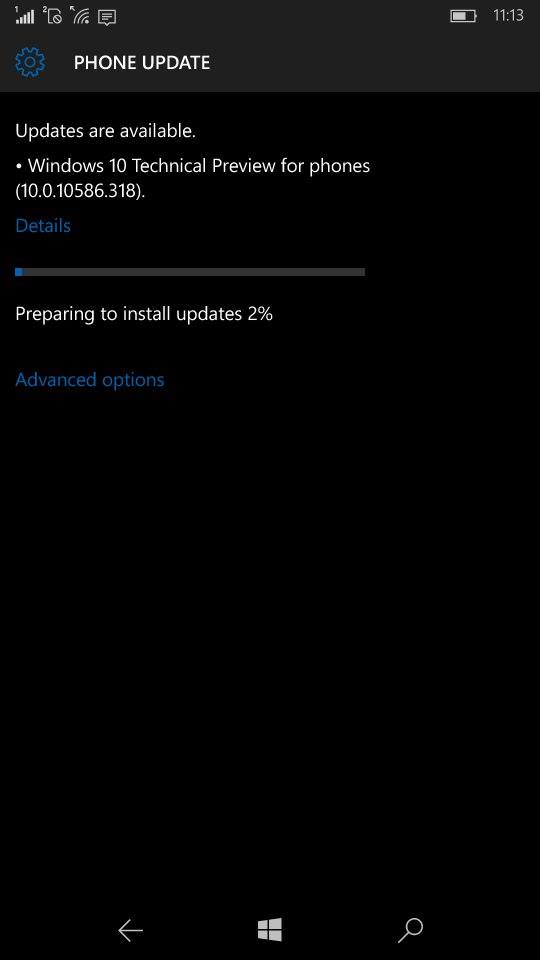
Windows 10 Build 10586.318 available for PC and Mobile devices. Full changelog

Microsoft has released this month's cumulative update for both smartphones and PC's running Windows 10. The update pushes the build number to 10586.318 and it is available for Windows Insiders in Release Preview Ring and to devices running Windows 10 officially. As it is another cumulative update, there is no new features added but there is a good amount of bug fixes for the two platforms. Here are the changes


  • Improved reliability in a number of areas including Cortana, Bluetooth, Shell, Internet Explorer 11, Microsoft Edge, Miracast, and USB.
  • Fixed memory leak that occurs when opening a portable document format (PDF) form multiple times.
  • Fixed issues with text alignment for right to left languages in Internet Explorer 11 and Microsoft Edge.
  • Fixed issue that affected Bluetooth function when a PC resumes from sleep.
  • Fixed issue where user accounts weren't locked out after a number of failed sign in attempts.
  • Fixed issue with revised daylight saving time.
  • Fixed issue that sometimes corrupts CompactFlash cards inserted into a card reader.
  • Fixed additional security issues with kernel mode drivers, remote procedure calls, the Microsoft Graphics Component, Internet Explorer 11, Microsoft Edge, Windows Shell, Windows Journal, Virtual Secure Mode, Schannel, and Jscript.

Windows 10 costs upto $199 after the offer ends, Upgrade now !

Microsoft has confirmed that the free upgrade to Windows 10 will be ending on July 29 as it was announced last year during the launch. As of now 300 million devices are in Windows 10 and Microsoft plans to get on 1 billion devices to Windows 10 in the next few years, for this target. free upgrade is supposed to act as a catalyst to the growth of the new platform. With less than three months remaining for the offer, the pricing of Windows 10 has reached the internet.

Here is the how the pricing of Windows 10 looks like after the offer ends
After July 29, 2016
Windows 10 Home: $119.99
Windows 10 Pro: $199.99

The pricing is very similar to how Microsoft priced their previous generation operating systems. Even the retail editions of Windows 10 which are available for purchase in Microsoft Store lists the same pricing. So it is pretty obvious that Microsoft would not change the pricing. In case you are wondering what are the differences between Home and Pro editions, you can find them here.


Microsoft has been very committed to actively update Windows 10 with new features and reliability updates. November update ( aka TH2 or build 10586) brought a plethora of improvements over the initial version such as improved snapping,colored title bars and more optimizations to the overall performance and reliability.

Saturday, April 30, 2016

Windows 10 Mobile has a future,a different one though


Windows 10 Mobile has been recently under the spotlight for several unintentional theories of the platform's future. This post is to discuss about the recent controversies that Windows Platform or specifically Windows phone platform has been going through since the last few months .What actually fuelled these controversies is the delay in W10M roll-out for the older devices and the ever shrinking market share of Windows Phone in the recent years. Looking at all this flood of posts, We decided to make it a little clear .

Let's kick off by talking about the instability of Windows 10 on Phones. Windows 10 Mobile has been in the Insider program for a long time but the RTM version took more time than expected to land on the old devices while the new flagship devices were continuously objected for having software with lot of bugs. Even though Microsoft clarified that monthly updates (named Cumulative Updates) will be shipped to devices and the bugs will be eventually ironed out, consumers couldn't stand the initial instability of the software in their flagship device.

Thursday, April 21, 2016

[Updated] Unlisted changes and issues in Windows 10 Mobile 14327

Microsoft dropped a new build earlier today for Fast ring Insiders for their mobiles, Windows 10 Mobile build 14327 comes with a couple of noteworthy features with messaging and availability of Cortana in new languages. The build packs a quite a bunch of bug fixes, importantly the app launch issue from start screen and apps list. You can find them here.
Now let's jump into the unlisted bugs and changes in the build.

1) Battery settings gets a better UI.

  Battery saver settings were merged under a single screen in the last build, this build further polishes the UI, the remaining percentage is shown in bigger font with the estimated time remaining under it. Also you can now find a quick link to battery saving tips in the bottom of the settings screen. I personally feel that battery life is a little bit improved over the previous build.

2) Store now shows notification for app updates and app installs. 

Friday, April 15, 2016

New issues and changes with Windows 10 Mobile build 14322

Windows 10 Mobile came out earlier today and it has brought a host of new features such as improved action center, play back controls on the lock screen and a few more. Not only that, it fixes many bugs ( almost 19 fixes ! ) Pretty cool. Check here for the changes.

That doesn't mean that we don't have any bugs in this build, a handful of them are listed in the Windows Blog. Now let me add some more to the list.
  1. Camera app fails to work properly in Lumia 535 after upgrading from 14295.The app opens and shows this error. The workaround is to use third party apps like Camera360 Sight or OneShot. Resetting your device doesn't fix the issue unfortunately :( Have to wait for a update for Camera or a new build.

    Upvote this feedback to report the issue : feedback-hub:?contextid=6&feedbackid=423b562c-4cb4-42b2-88ed-a296453f26b1&form=2&src=2

Wednesday, March 2, 2016

Lumia 650, Tip of the ice berg ?

Microsoft's latest Lumia has been under the scanner from last week for its fantastic design and also for its lower than expected internals. So why ? Why has Microsoft kept the specifications of their Windows 10 mid ranger below expectations ? There is one answer, Windows 10!

Microsoft has been trying to boost the market share of Windows phone since it bought Nokia, they've been releasing low end phones back to back but the consumer interest remained the same. Even though the low end Lumias pack enough power to provide exceptional value for money, unfortunately they never took off. Of course devices like Lumia 640,535 & 540 were hit in the Asian and European markets.

Saturday, February 27, 2016

Halting Android Windows Bridge (Astoria) makes sense!

I know most of the people who follow Microsoft closely were elated when they announced Project Astoria in BUILD conference, a Windows Bridge for porting Android apps. That meant that the app gap will finally be covered as developers would find it easy to bring their apps to Windows (Phone) Platform. Microsoft even went ahead and set core of Windows 10 Mobile to run Android apps via side-loading!
  ios_android_win10_1-720x420

But then it happened, Microsoft slowly back tracked the progress of this specific bridge and remained tight lipped for what seemed to be a very long time until recently. They removed the core components of Android subsystems with newer builds and I think that was because it had significant impact on performance the OS. I had always wondered how Microsoft could bring Android apps without the well known problem of Android, performance!

Friday, January 15, 2016

Windows Update MiniTool lets you control Windows Updates in Windows 10

If there is one thing that most power users regret over upgrading to Windows 10 is, it will be the lack of controlling Windows Updates as they could do in the previous versions of Windows. Windows 10 Home is set to automatic updates while the Windows 10 Pro offers a little more control by deferring the updates for few months. Also I personally find the new Windows Update lacking a lot of information, importantly the size of updates is a big deal for me as it would help to calculate the required time for the process. This is where Windows Update MiniTool comes as a handy solution.
The tool provides the necessary details and goes beyond the basics by providing granular control over how Updates are installed in your PC. You can actually select any of the given modes such as Download only,Notification mode, Schedule or Disable it completely though it is not recommended to do so.
WindowsUpdateMini1

Saturday, November 7, 2015

How to set a custom search Engine as default in Microsoft Edge Mobile

If you're using the latest build of Windows 10 Mobile preview ( Build 10581),then you all know that the default search engine in Microsoft Edge is Bing and there is no way to change it. But you can change it with a couple of changes.

Follow the steps to set the search engine of your choice. In the below example, I will set Google as the default one.

By default Bing is the only search engine in Edge
1) Navigate to www.google.com

2) Now Open settings in Edge browser and set the website preference to "Desktop".

Tuesday, October 6, 2015

Windows 10 event : Watch it live !

So the big day for Microsoft is here. Today's Windows 10 event will mark the official announcement of many new devices from Microsoft with Windows 10 Mobile being one of the important announcements and yes, we are getting the Windows flagships after a long time, the Lumia 950 and Lumia 950 XL.

What to expect : 

Lumia 950 and Lumia 950 XL 

Microsoft has already confirmed these devices. Lumia 950 and Lumia 950 XL are bound to arrive with 5.2-inch and 5.7-inch display, respectively, both boasting QHD resolution. The larger model takes advantage of a Snapdragon 810 processor with 3GB of RAM and 32GB of internal storage, while the smaller one relies on a Snapdragon 808 processor with the same amount of RAM and storage. The Lumia 950 XL works with a 3,300mAh battery, while the Lumia 950 has a smaller 3,000mAh battery. Both the models will have expandable storage with a Micro SD card slot supporting upto 128GB.
Lumia 950

Lumia 950 XL
They share a 5MP front shooter with Iris scanner for Windows Hello and 20 MP PureView rear camera with triple LED flash.Both these devices will feature Continuum and have USB type C connectors for quick charging and wireless charging is included.

Monday, September 28, 2015

Nearly 700,000 apps in Windows Store !

Windows 10 is having a successful run across the globe despite the privacy problems. Softpedia reports that Microsoft has stated that there are 669,000 apps available for download in Windows Store. This includes mobiles,tablets and PC's combined and it is not clear on how many of them are Universal apps.


It is interesting to see the growth rate of Windows 10 and Apps, definitely there is a increase in interest from the developers to bring their apps to Windows Store as it has the potential to reach millions of people using Windows in devices with different form factors, all with a single code. Also the report states that the number of apps is rapidly growing as hundreds of apps are added each day. Even though it sounds quite positive, Microsoft should make sure that the quality of the apps is maintained as the numbers make no sense when the apps are just clones or fake. They have already faced this scenario with Windows 8.x and with Windows 10 in 75 million devices already and still rolling out to millions of people coming from Windows 7, Microsoft should take care of this issue seriously.